
×
Bidding has ended on this item.
This Auction Uses Proxy Bidding.
Ended
- Winning Bid: $4.00
- 4 Bid(s) View Bid History
- High Bidder: dpde
Seller - BidBid-Inc
Payment Options
Seller Accepts Credit Cards
Seller Accepts Cash
Lot # BU03M421524
System ID # 1419129
Start Date
End Date
1 Watching
Description
Location: Montreal
In Packaging?: Yes
Functional: Yes
Assembly Required?: No
Damaged?: No
Missing Parts?: No
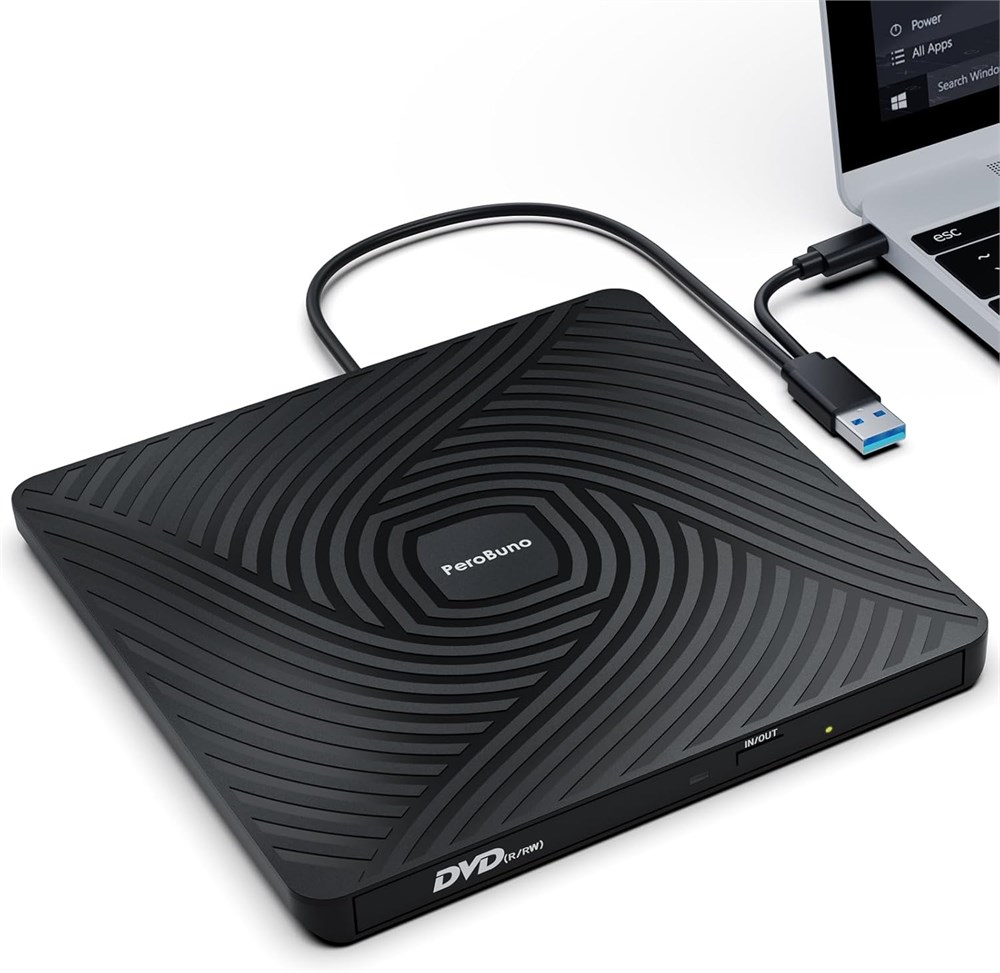
Ultra-Slim & Portable External DVD Drive Only 13mm thickness Lightweight, compact design perfect for travel, work, or home use. Fits easily in your bag! And it's the perfect companion for ultra-thin laptops! Plug & Play External CD Drive No external power or drivers needed. Simply connect via USB for instant reading/writing. 2-in-1 USB A and USB C cables are built into the bottom of the usb dvd drive, so you can take them out whenever you need them and plug them back in after use, saying goodbye to carrying extra annoying cables. High-Speed USB 3.0 Disc Drive Delivers fast data transfer (up to 5Gbps) and smooth CD/DVD reading and burning (backward compatible with USB 2.0). The usb disc drive provides up to 8x DVD read/write speed and up to 24x CD read/write speed. Wide Compatibility External Disc Drive The external dvd burner is compatible with Windows 11/10/8/7/Vista/XP/2000/98/SE/ME, Mac OS, and Linux (Ubuntu is not supported). This external cd/dvd drive for laptop supports CD+/-R/RW, CD-ROM, DVD+/-R/RW, DVD+/-R DL, DVD-ROM, DVD-RAM, VCD, and SVCD. Note: Blu-ray discs are not supported. Multi-Functional Usb Disk Drive Perfect for installing software, system, games, playing movies, music, burning discs, or backing up files. Things to Know Before You Buy This disc player needs to be connected to a laptop or desktop to start working, so it is not compatible with cars, TVs, projectors, tablets, iPads, mobile phones, PS 4/5, Xbox, Nintendo Switch, Chromebooks, Surface, Ubuntu systems, or Blu-ray discs. Due to limitations of Mac OS, the tray can't be opened by the button after playing or burning a disc. To eject a disc on a Mac, right-click the desktop icon and select "Eject", or select "File" > "Eject" from the menu. For desktop computers, connect the cd reader to the USB port on the back of the computer motherboard.
Functional: Yes
Assembly Required?: No
Damaged?: No
Missing Parts?: No
Ultra-Slim & Portable External DVD Drive Only 13mm thickness Lightweight, compact design perfect for travel, work, or home use. Fits easily in your bag! And it's the perfect companion for ultra-thin laptops! Plug & Play External CD Drive No external power or drivers needed. Simply connect via USB for instant reading/writing. 2-in-1 USB A and USB C cables are built into the bottom of the usb dvd drive, so you can take them out whenever you need them and plug them back in after use, saying goodbye to carrying extra annoying cables. High-Speed USB 3.0 Disc Drive Delivers fast data transfer (up to 5Gbps) and smooth CD/DVD reading and burning (backward compatible with USB 2.0). The usb disc drive provides up to 8x DVD read/write speed and up to 24x CD read/write speed. Wide Compatibility External Disc Drive The external dvd burner is compatible with Windows 11/10/8/7/Vista/XP/2000/98/SE/ME, Mac OS, and Linux (Ubuntu is not supported). This external cd/dvd drive for laptop supports CD+/-R/RW, CD-ROM, DVD+/-R/RW, DVD+/-R DL, DVD-ROM, DVD-RAM, VCD, and SVCD. Note: Blu-ray discs are not supported. Multi-Functional Usb Disk Drive Perfect for installing software, system, games, playing movies, music, burning discs, or backing up files. Things to Know Before You Buy This disc player needs to be connected to a laptop or desktop to start working, so it is not compatible with cars, TVs, projectors, tablets, iPads, mobile phones, PS 4/5, Xbox, Nintendo Switch, Chromebooks, Surface, Ubuntu systems, or Blu-ray discs. Due to limitations of Mac OS, the tray can't be opened by the button after playing or burning a disc. To eject a disc on a Mac, right-click the desktop icon and select "Eject", or select "File" > "Eject" from the menu. For desktop computers, connect the cd reader to the USB port on the back of the computer motherboard.